
One more interesting and useful topic for the software developers.
PostgreSQL
PostgreSQL, also known as postgres, is a popular database management system that is used to handle the data of many websites and applications.
sudo apt-get update
sudo apt-get install postgresql postgresql-contrib

The installation procedure created a user account called postgres that is associated with the default Postgres role. In order to use Postgres, we'll need to log into that account.
sudo -i -u postgres
You can get a Postgres prompt immediately by typing:
psqlExit out of the PostgreSQL prompt by typing:
\qWe can create a new role by typing:
createuser --interactive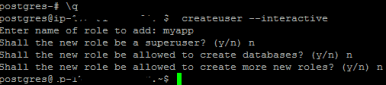 Note this :
So if I have a user called test1, that role will attempt to connect to a database called test1 by default.
You can create the appropriate database by simply calling this command as the postgres user:
createdb test1

If you want your user to connect to a different database, you can do so by specifying the database like this:
psql -d postgres
Variations of changing password in Postgresql
Change a user’s password:
ALTER USER davide WITH PASSWORD 'hu8jmn3';
Change the expiration date of the user’s password:
ALTER USER manuel VALID UNTIL 'Jan 31 2030';
Change a password expiration date, specifying that the password should expire at midday on 4th May 2005 using the time zone which is one hour ahead of UTC:
ALTER USER chris VALID UNTIL 'May 4 12:00:00 2005 +1';
Make a password valid forever:
ALTER USER fred VALID UNTIL 'infinity';
Give a user the ability to create other users and new databases:
ALTER USER miriam CREATEUSER CREATEDB;

List the current roles and their attributes by typing:
\du
 Refer more links:
https://www.digitalocean.com/community/tutorials/how-to-secure-postgresql-on-an-ubuntu-vps
https://www.digitalocean.com/community/tutorials/how-to-install-and-use-postgresql-on-ubuntu-14-04

 Techiehints Software